 NEXT4I

6 Aug 2026
BuildInPublicSecondBrianKnowledgeManagementAIToolsAI

In my last post, I described how I run AI agents like a factory line: Quality Gates, TDD, one concern per ticket. That might sound like I had it figured out from day one. I didn't. Before N-Flow Agentic Inception could run long jobs on its own, I broke things badly and had to tear the whole setup down more than once.
Have you ever looked back at your old prompts and thought, "How did I ever give an AI instructions that bad?" I have. That lesson came with unreadable tickets, code that wouldn't even start, and an $18+ API bill for a single prompt. That month alone came to more than $1,000.
I kept it way too simple. My requirements had grown to over 10,000 lines spread across several files. I wrote some myself and had AI write some for me, scripts and tables I barely understood. I just added whatever came to mind, jumped between topics, and never organized it into sections. Then I told the AI: "Break this into tasks for me."
It did. I got a pile of tickets. The problem was I could barely read any of them. They were full of reference numbers pointing at each other in every direction.
My first thought was: "If a human can't read it, maybe this is how AIs talk to each other. Must be good." It referenced files, line numbers, commit hashes, and even the points where I had approved something. Everything was so tangled that I ended up not reading them properly at all.
From memory, a ticket looked roughly like this:
Ticket: T-D-0001 Create record A0144 using B1345, but allow 4456 from git diff 0d12g41. On Save, validate V-123 with V455. Ignore all permissions except (P-001, P-004, P-005). See
services/dataService.go, lines (123, 125, 264).
To be safe, I gave that ticket to a small model, Gemini Flash 3.x, and asked whether it was a good ticket. My logic: if a model that isn't the smartest can understand it, the ticket must be well written. The answer:
"This is a very good ticket. The references are clear, it names the files to change, it includes commit references to the existing codebase, and it even marks where the owner approved. Overall, this ticket is very good."
I was thrilled. (Looking back, I still laugh at myself. A messy ticket, and then a review praising the mess. If I'd asked Claude to roast it, I'd probably have been torn apart.) I started dreaming big: from now on I'd just hand over the work, tell the agent not to ask questions and approve its own recommendations until the end (because I wanted long uninterrupted runs), and check the results once.
That's what I mean by "the AI hallucinated, and so did I." (Hallucination is when an AI produces an answer or a piece of work with full confidence, even though it's wrong or meaningless.) The first AI produced nonsense tickets, the second AI said they were great, and I believed both.
Fully confident, I started feeding tickets into the grinder. I ran 3 to 5 tickets at once, like dropping 3 to 5 chunks of pork into a meat grinder, and planned to let it run overnight and wake up to finished work.
The result? A total mess.
Ground meat, exactly as the metaphor promised. The agent closed tickets without knowing what it had written. I've been writing code for well over a decade, frontend and backend, and I couldn't tell what that code was doing or what the change was for. It didn't even run. I didn't know where to start fixing it.
When I dug in, the root cause was clear: every ticket mixed everything together. One ticket said do A, then B, then C. When the agent followed it, the logic inside the service got tangled, and so did the context it had to keep in mind.
(If you're not a developer: we split code into separate "rooms" for separate jobs, so each room has the right tools and they're easy to share. Like a hospital keeping the operating room separate from the kitchen, for hygiene and for workflow.)
My agent merged the operating room and the kitchen. It picked up a scalpel to chop vegetables, then went back to surgery with the same knife. What came out:
And plenty more.
You can't talk about this kind of failure without talking about cost.
Back then I mostly used Cline (not Claude Code yet) with my own API key, pay-as-you-go, and I picked a top model, Claude Opus.
I fed in that giant unstructured requirement. One prompt cost me $18+. What I got back wasn't very usable, and I kept tweaking it with no clear direction. And it wasn't a one-off. I repeated the same mistake several times before it sank in.
The monthly total hurt even more. In September 2026, my on-demand AI spend came to about $1,190. It wasn't just Claude, either. I was trying several providers and models. July and August were $244 and $206. September was the worst.
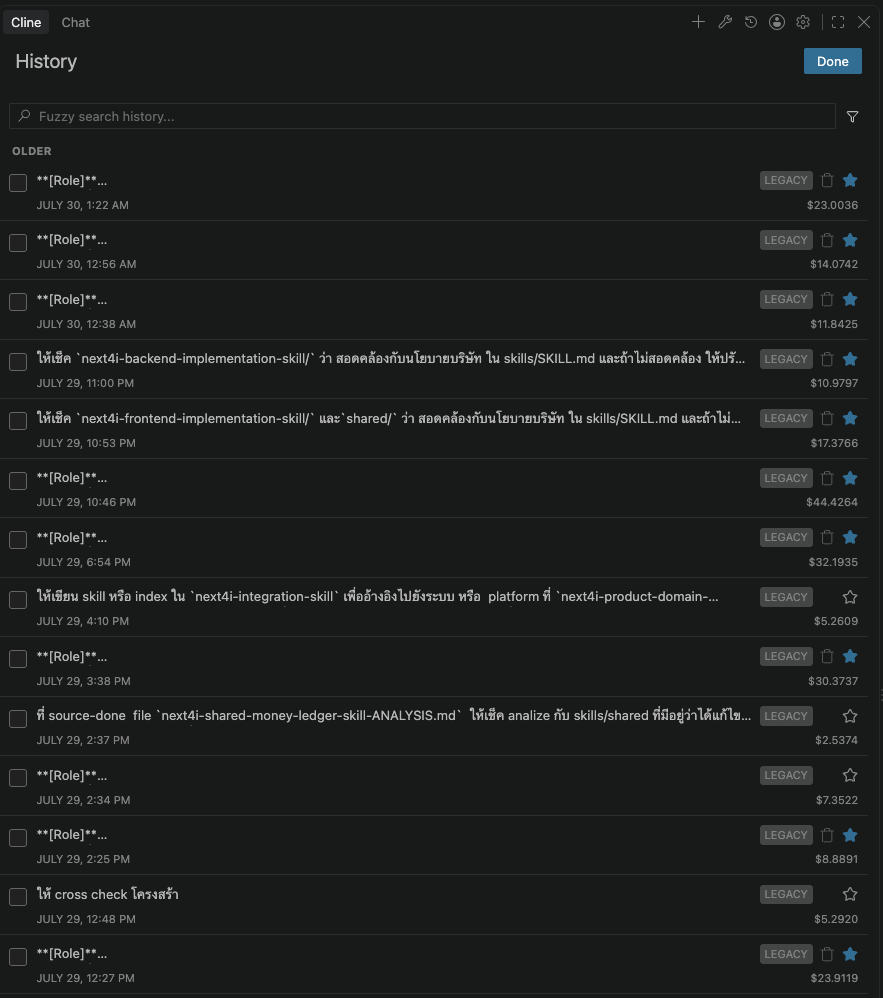
To be fair, not all of that money went into broken work. Some of it paid for work that turned out well. But most of it came from the period of bad instructions I've described here.
To be clear, my point is not that Claude is expensive. I used it the wrong way. I asked the most expensive model to guess at a requirement that even I hadn't organized.
It also showed me something else. On a monthly subscription, users like me get a very good deal, because the AI companies absorb a lot of the compute cost. Pay-as-you-go API pricing is what AI actually costs, and it's a lot higher. Since then, I don't mind paying for the subscription at all.
That lesson ($18+ a time, several times) made me tear down the whole workflow. What came out of it is now the core of N-Flow Agentic Inception:
If you read the previous post, the factory line, one ticket per concern, TDD with evidence, and the Quality Gate all came from this scar.
None of this means the AI stopped hallucinating. It still can. What changed is that I catch it sooner: tickets are small enough for a human to read, tests need evidence of both the failing run and the passing run, and anything uncertain still gets checked by a person.
After the rebuild, October and November dropped to almost nothing. I want to be clear about why.
Here's my latest comparison, running the same ticket from the Auth system (sign-in and user permissions) on three models:
| Model | Cost/ticket | Time | Whole Auth (181 slots) |
|---|---|---|---|
| Opus 5.5 | $0.217 | 86s | ~$39 |
| Sonnet 5.5 | $0.089 | 38s | ~$16 |
| Sol 6.1 | $0.068 | 86s | ~$12 |
(Cost per ticket is based on API token pricing, even though I'm on a subscription now. The Auth totals are cost per ticket times 181 slots. They're estimates, not actual spend.)
Cost per ticket differs by more than 3x, and the most expensive model isn't the fastest either. That's why the workflow picks a model based on how hard the ticket is. An easy ticket doesn't need the top model.
My agentic workflow isn't about throwing a long prompt at an AI, letting it write code and some basic tests, and waiting for the result. It's about designing an engineering system that keeps the AI working the way you planned.
Looking back, it's the same as working with people. Hand a team a jumbled, unreadable requirement and you'll get messy work back too. AI just shows you the result faster, and the bill faster as well.


ลงชื่อเพื่อรับแจ้งเตือน และร่วมเป็นผู้ใช้งานกลุ่มแรกพร้อมรับสิทธิพิเศษ
Drop your email to get notified. Early access members get exclusive perks!
We hate spam as much as you do. Only big updates, no junk.
No subscriptions. No annual fees. No lock-ins.